
In the first part we built a pyRevit button that exports the state of a Revit project to a JSON. On its own, that JSON means nothing to a person. In this second part we hand it to Claude Code together with the BIM Execution Plan and get a real assessment back: what meets the standards, what doesn’t, and why. Then we go into Revit and check whether it’s telling the truth.
The AI Audit Pipeline
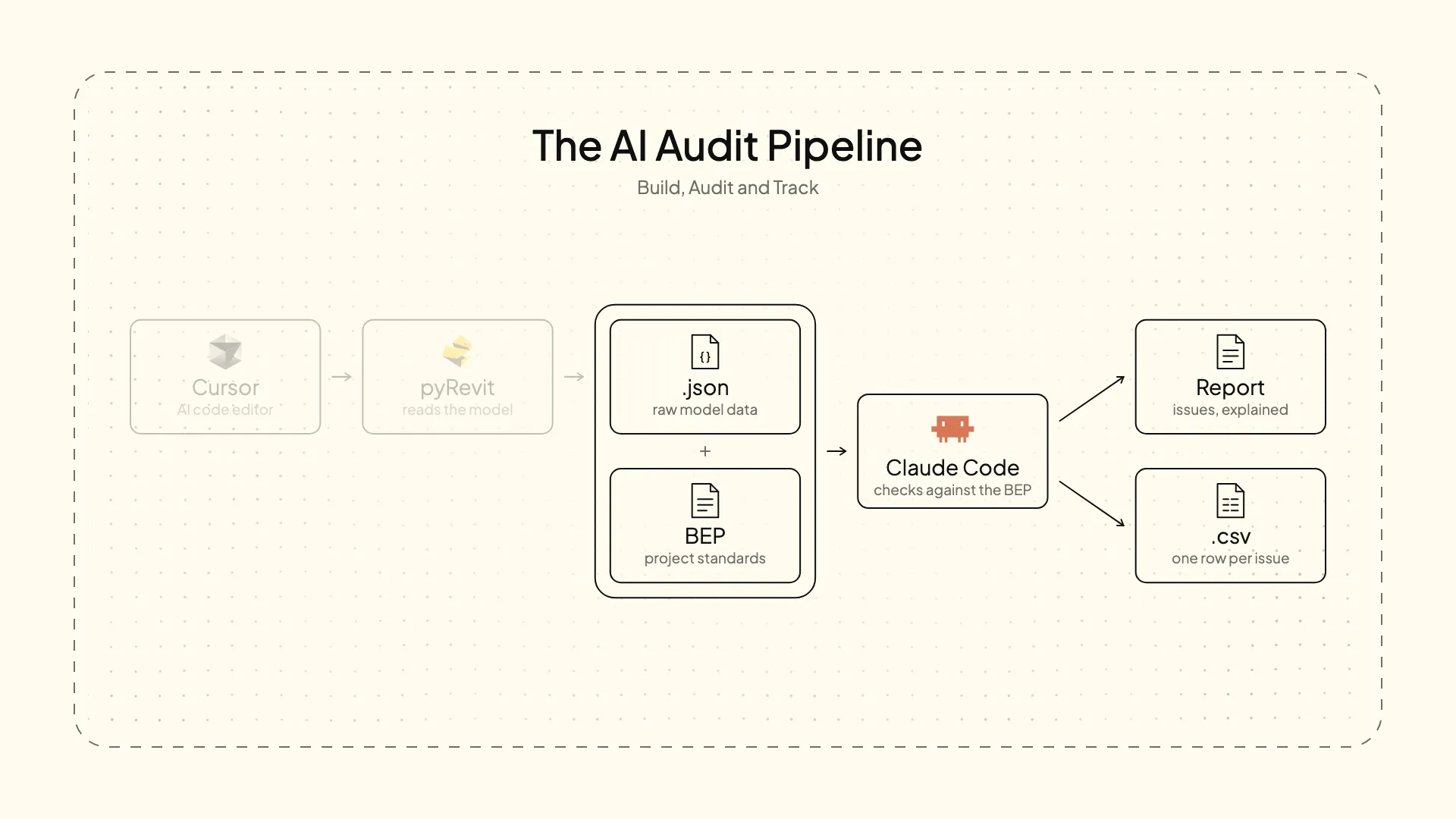
No MCP, no integrationsThe model and the AI never talk to each other directly. You extract the data, give it to the AI, and it does the rest. That keeps them independent: you can change the AI, or the extraction script, without touching the other. You gain freedom, and the decisions stay yours.
Two inputs, two outputs
The audit folder has a claude.md at its root. It does the same job AGENTS.md did in Cursor: the instructions Claude Code reads as soon as it starts. The core of it is what goes in and what comes out.
Inputs
- The
.jsonexports from the pyRevit button → what the models contain. - The BIM Execution Plan → the rules and limits each check is measured against.
Outputs
- A report → for a person to read and know how the project is doing.
- A CSV → one row per check, for the dashboard in the third part.
The rest of the file is there so nothing breaks. Naming and filing rules, so every file lands in the right folder. Every column of the CSV, with its data type and an example row. Empty means no data, so that zero really means zero. A sanity check: flag any value that is implausible for a building. And export traps, like the same ElementId showing up in two models, which is normal and not an error. On top of that, the previous audits in the folder work as examples.
Running it
The test models are Snowdon Towers, from Revit’s samples folder, with an export for every week from 1 to 38. With everything in place, the request is one line.
Prompt:
Give me the two Outputs of the latest auditWhy not a chatbotThe difference from pasting all this into a chatbot is that Claude Code works on the files where they are: it reads every export, and writes the report and the CSV straight into their folders. A few minutes later, both are there.
The report
The report goes check by check. Each one gets a verdict, PASS, WARN or FAIL, measured against the limit the BEP sets, the reason in plain language, and the IDs of the elements involved.
That’s why the BEP has to be written so it can be measured. For imported CADs, for example:
- The model gets a PASS if it has 0 imported CADs
- WARN if it finds 1 or 2 imported
- And if it finds 3 or more, the model FAILS.
A limit written like that leaves nothing to interpret. A vague one (“avoid imported CADs”) would leave the AI guessing, and the verdicts with it.
Where the AI earns its place is in the findings that don’t come from a threshold. Duplicate sheet numbers across different models, or sheets whose number doesn’t match their discipline: things that are hard to catch even with code, because you’d have to know every rule in advance.
Check it in Revit
A report written by an AI is only worth something if it’s right. That’s what the IDs are for: every finding carries them, so checking it takes seconds. Manage → Inquiry → Select by ID, paste the IDs, and Revit selects the elements. In a 3D view you see at once whether that floor really is two kilometres away.
The AI proposes, you decideThe report says what doesn’t meet the BEP. Whether to delete it, tell whoever’s responsible or leave it depends on the project, the phase and the contract. That decision stays with a person.
The summary
At the end, a table adds up the results: 11 checks times 7 models. If all you want is a quick read of how the audit went, without going through the whole report, this is where to look.
| Fail | Warn | Pass | Total |
|---|---|---|---|
| 17 | 14 | 46 | 77 |
Conclusion
The AI isn’t what extracts the data, and it isn’t what sets the rules. pyRevit extracts, the BEP sets the limits, and Claude Code does the part in between that used to take hours: reading everything, comparing it against the standard and explaining what’s wrong and why. And with the IDs, nobody has to take its word for it.
A report is a snapshot of the project at one moment. The interesting part comes when the audits pile up week after week and you can see how the project evolves. That’s what the CSV is for, and it’s what we turn into a Power BI dashboard in the third part.